


Okay, time to explain some address book updates that have been happening. For those that have accessed the sheet the last few weeks, you’ve probably noticed that the options for export have changed a bit. Used to be there was an export sheet only by family name; that’s been upgraded. There are now three options for sheet exports:
- Family Names
- This option goes by the format of “The Schleicher Family”. No family members are specifically listed, unless that family member is a single head of household (HoH).
- Listed Names
- Another informal listing, this export option lists all names associated with the HoH and with the “Include in Mailings” field set to “True”, e.g., Alex, Natalie, Peter, and Winifred Bree Gambon.
- Formal Address Format
- This export option follows traditional formal addressing (Mr., Mrs., Ms, Dr., etc.) and includes children linked to the HoH with the “Include in Mailings“ field set to “True”.

The export tables are designed to be downloaded and then directly uploaded into an online address book (e.g., Shutterfly). I’ve tested with Shutterfly, and all 3 formats import directly in without issue.
Format tables were added based on different card addressing I’ve noticed (or received), so I wanted to give everyone easier options to try to meet as many different preferences as possible.
Not only have the export tables been added, but the main table is tied into the birthday/anniversary calendar and notification flow directly. Previously, when entries where added or changed I would have to update both the sheet, the family tree, and TWO calendars (one for the site and one for the actual notification). Now the database hooks directly into one calendar that drives all the notifications. When a change is made to a record (either a date, name change, or new entry), a script fires every day that updates the calendar with the change.
Working with new fields
To make the different tables work, a few new fields have been added for each entry; I’ve gone through and updated each member best I can. In general, fields should make sense. Some callouts:
- Title
- Optional field, but will determine order listed on the formal address table (e.g., the title of “Dr.” will be listed before other members without that title)
- Nickname
- Informal tables (Listed names table) and the birthday/anniversary reminders will use nicknames if present
- Gender
- While not required, the formal table logic will use gender to determine Ms., Mrs., or Mr. if not filled out as well as to handle spouse relationships in certain scenarios. Generally, it helps determine naming order on the label.
- Household
- This is probably one of the most important fields! The household field determines if a record will be created in the export tables!
- Think of the HoH field as somebody has moved out and is independently living on their own and their record serves as the primary address for any associated with that household.
- Relationship to HoH
- Important for the formal address table; the relationship to HoH determines if a person will receive mailings by default (e.g., adult children over 18 by default will not get included in the listed names or formal addressing, nor would roommates, relatives, etc.)
- This field allows flexibility mainly for college students living at home part-time and allows them to either be included in the family addressing, or split off on their own without separating them out as a HoH yet
- Spouse
- Another important field; linking a spouse (and it needs to be done in BOTH records), drives both anniversary notifications correctly and the formal addressing table. Anniversary notifications will match and generate based on members having the other as a spouse (e.g., Zack’s record lists Brittany as a spouse, and Brittany’s record lists Zack as a spouse). The formal address table looks for this too to drive appropriate titles; an entry with an anniversary but no spouse would be “Ms” (and the algorithm also looks to check gender), while an entry with an anniversary AND a spouse gets Mrs. (plus the gender check).
- Include In Mailings
- This field should, by default, be selected as “True” unless you do NOT want the member included in mailings.
- Selecting this field as “False” will give another option to “Create Separate Entry”. If “True”, a record will be made in all export tables linked to the address for the entry. If false, no record will be made any any export table.
Working with the Include in Mailings field
We’ll use Hailey as the example (also the reason I even went this route). Hailey is in college, so we can either just send a card to her campus address, addressed only to her, or include her in Brian and Jessica’s card with formal addressing or the listed names table.
So, let’s start with just leaving Hailey in with the regular family mailings. This has the “Include in Mailings set to “True”, so she’ll still be included, although her record in the main table has her college address, and the entire family gets rolled up under Brian with the address on his record serving as the primary mailing address.


Now, in this case we’ve set the “Include in Mailings” field to “False” and “Create Separate Record” to “True”. This leaves Hailey as part of Brian’s household, but creates a new entry for her in the export tables that links to the address listed in her record. She also gets her own separate record in the listed names and family name format. When she is home, or we want to add her back to the family mail labels, we switch the “Include in Mailings” back to “True”.

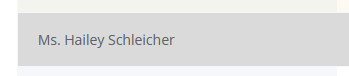
The main reason this field exists is to handle college students living part-time at home that have not moved out, technically, and to provide more control over adult children living at home or grandparents/relatives living with children. Not common, but is more common now than it used to be. This gives a little better control over how you want your address labels to look, as well as how you want your family grouped.
Table Update Timestamps
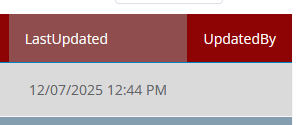
Two columns have been added to help determine the last update of a record to prevent overwriting of data incorrectly or unintentionally. This will hook into the current user updating the record; the the UpdatedBy column is blank; it was a system update (e.g., I went through and applied a bulk update in mySQL, won’t usually be the case though after this first load).
Filtering and Searching
Search and filter functions work on the main table; to narrow down the view I do recommend using the filters! By default, all 102 entries will load.
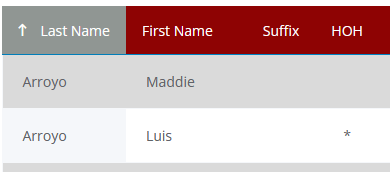
For example, let’s use Maddie and Luis as an example. Notice Luis has a “*” beside his name; this identifies him as the HoH.
I will usually do one of two things when hunting for a record: either I’ll narrow it down to the Schleicher sibling with that filter, or I can narrow for all members in the HoH.
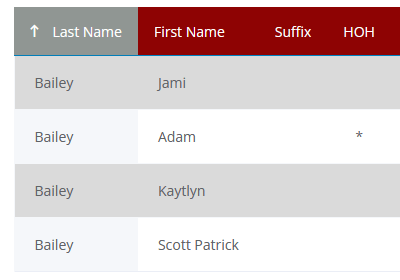
Another example, I’ve filtered this list down by Adam, HoH, and it will list ALL members associated with the HoH.
Note that this filter does NOT take into account the “Include in Mailings” or “Create Separate Entry” fields intentionally.
Adding new members
One last callout when adding a new member that is also going to be a new HoH (e.g., somebody gets married). Add the new member first, selecting “Self, new head of household”. Save the record,then refresh the table using the button at the top of the page or the browser refresh. This runs a background check that sees the new HoH, adds it to the list, and fixes the original entry correctly. After refresh, you’ll be able to assign members to the new HoH cleanly.

Author: Zack
Pharmacist, tech guy, gamer, fixer. Good at a little bit of everything.
